


To determine the expiration date or reference number for a Dexcom product, look on the outside of the box. The expiration date will be clearly printed on the side of the box, the top of the box, or on the bottom of the box.
Expiration Date and Reference Number Locations
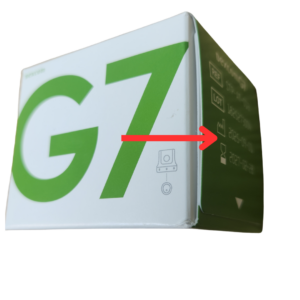
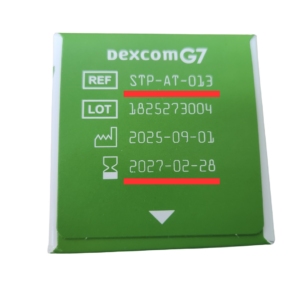
Dexcom G7 Sensors and G7 15-Day Sensors
Look on the side of your box for the REF number and expiration date.
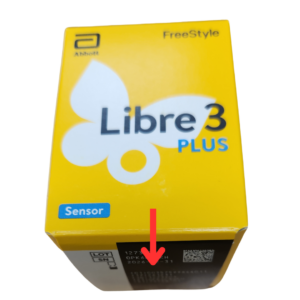
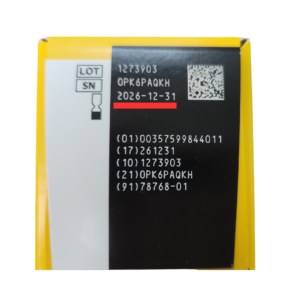
Libre 2, Libre 3, and Libre 14-Day Sensors
Look on the bottom of your box for the expiration date.
Expiration Date Guidelines
To determine how many months are left until your supplies expire, count the current month as “0” and the next month as “1” and so forth. For example, if the current month is January (month 0), and your test strips expire in August, we would consider the test strips as being seven months before expiration.
This is how we count when figuring out your payment. We are able to pay the most for diabetic supplies that are furthest from expiring. Expiration dates and payments are explained on our Sell Your Strips page. If you have any questions, don’t hesitate to call us at 855 578 7477.
Sell your diabetic supplies today to a company you can trust.